The full tour

Everything inside Clippin.

One long video in, a week of premium vertical clips out — here's every tool that makes it happen, all running on your own Windows PC.

Create & cut

From any source to perfect cuts.

Clip Editor

A hands-on timeline studio. Scrub the waveform + filmstrip, mark each clip, then hand-frame the 9:16 crop — drag it, keyframe a pan & zoom, snap to guides, or let AI follow the subject. Edit the caption words, add per-clip effects (flip, speed, fades, colour), drop in your own sound effects at exactly the right moment, and preview it all live over your real footage — with full undo/redo and a live look at Crop, Blur, and Split frame modes.

Channel autopilot

Watch for new YouTube uploads automatically, then clip each one without rebuilding the workflow — with back-catalog backfill that keeps the queue full without overflowing the schedule.

YouTubeClippinTikTok

Clip almost anything

YouTube channels and links, other yt-dlp sites, a watched local folder, or video files on your PC — even podcasts and audio become captioned waveform videos. 720p or 1080p.

Smart cut points

Snaps each clip's start and end to natural pauses, so clips never begin or end mid-sentence.

Silence & filler trim

Automatically cuts dead air and “um/uh” filler so talking-head clips stay punchy.

Crop or blurred-fit

Fill the 9:16 frame (AI can aim the crop), or fit the whole video over a blurred background so nothing gets cut off.

Two-speaker split

Stack both people from one 16:9 frame, top and bottom — the clean interview & podcast layout, in one click, with a swap toggle if the layout's mirrored.

🎮

Dual video

Record your facecam and gameplay/screen separately — Clippin composites them for you, picture-in-picture or stacked, with per-clip position & size and a live preview in the Clip Editor.

4:5 & 1:1 formats

Also save square and portrait feed versions of every clip, alongside the 9:16 — ready to post anywhere.

The AI toolkit

Clippin watches the video for you.

Bring your own AI — Claude, OpenAI, or Gemini (pay-as-you-go, typically pennies per video), or run it free and fully offline with a local Ollama model. Every feature falls back gracefully if it can't run.

Highlight picking

Reads the video's transcript and clips the funniest, most surprising, most engaging moments — instead of blind sequential cuts.

🔥

Viral scoring

Rates every clip's viral potential 0–100 with a one-line reason, so you post — or prioritize — the strongest cuts instead of guessing.

Smart framing & face tracking

Aims the 9:16 crop at the subject — or turn on face tracking and the crop smoothly pans to follow them across the whole clip.

Written captions

A distinct, hooky caption plus hashtags for every single clip — tuned to your niche, never repetitive.

🎥

Credit the source

Auto-adds a "credit: @channel" line to the caption for clips pulled from someone else's video — on by default, one toggle to turn off.

🎞

Auto B-roll

Finds the keyword moments and drops in relevant stock footage as full-frame cutaways — with captions on top — the way the top AI clippers do it.

🖼

Auto covers

Generates a titled, scroll-stopping cover image for every clip — a bold word-pop headline over a clean frame — ready to set as your TikTok cover.

Quality gate

Set a minimum viral score and Clippin holds weaker clips in review instead of auto-posting them — only your strongest cuts go out.

🛡

Brand-safety filter

Block clips whose captions contain profanity or your own custom words, to keep a channel advertiser-friendly.

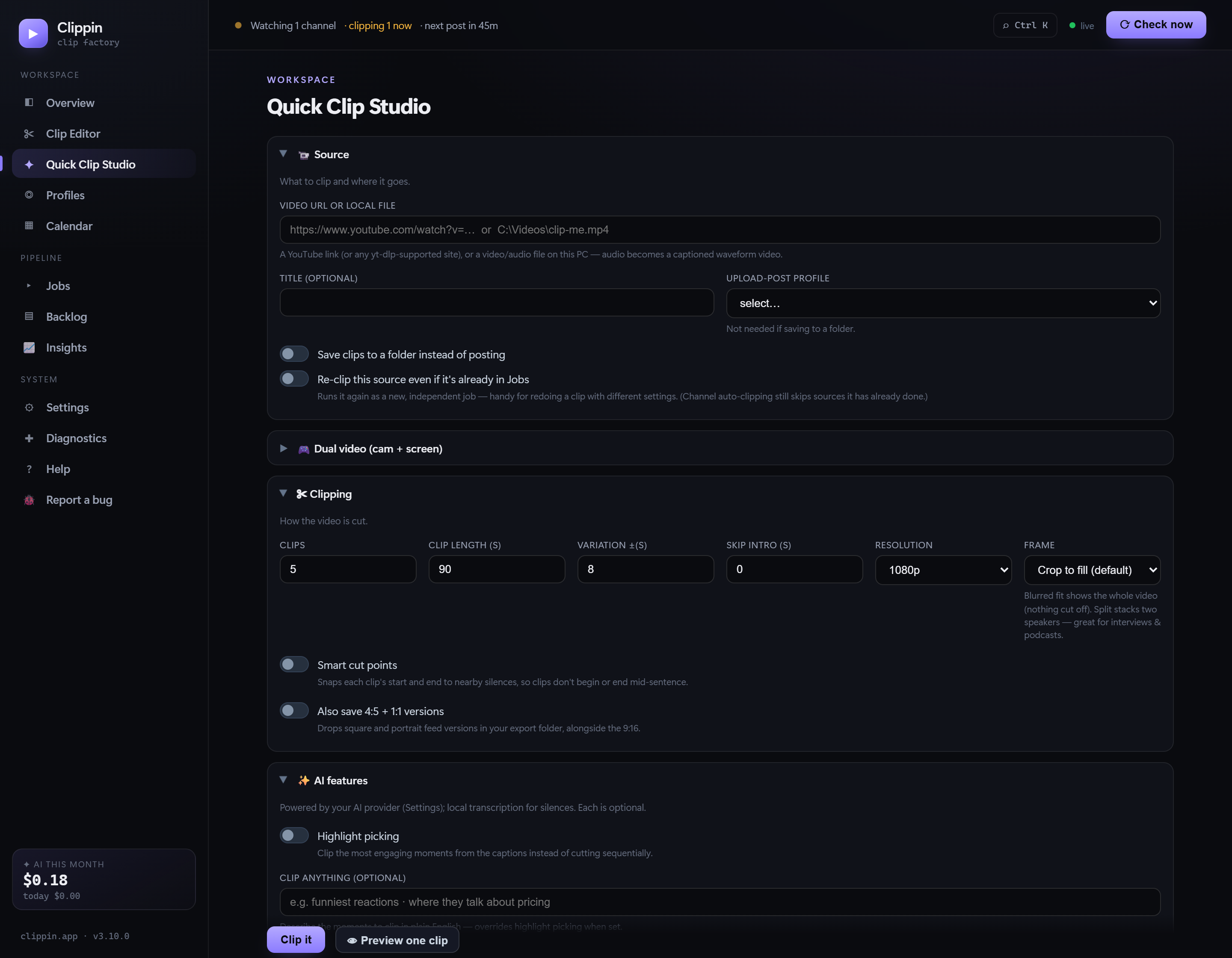
Quick Clip Studio

Design the look. See it before you post.

Style your captions, watermark, hook, and end card — fonts, colors, sizes, on-screen positions — and watch a live 9:16 preview update as you type. No render-and-check guesswork.

  • Word-pop “karaoke” captions — ALL-CAPS, animated, keyword-highlighted
  • 6 bundled viral fonts + color-grade presets, vignette, film grain
  • Full control of captions, watermark, hook, end card & progress bar
  • Live phone-frame preview — Hook · Clip · End card
  • Save style presets and reuse them in one click
Quick Clip Studio
Clippin Quick Clip Studio with a live 9:16 style preview
Style & sound

The premium look, burned in.

Subtitles & word-pop

Any font, color, size, and position — outline, boxed, shadow, or the viral word-pop “karaoke” style where each word highlights as it's spoken.

🎙

Local transcription

Transcribes speech on your own PC (bundled Whisper) — so captions work on any video, even local files with no captions. Nothing is uploaded.

🔥

Trend pack

Auto color-emoji on keyword moments (size, position & frequency your call), punch-in zooms on emphasis, and whoosh/pop sound effects.

Branding & presets

Watermark, opening hook, and end-card CTA — style and position them all, then save the look as a one-click preset.

Background music

Point at your royalty-free tracks; Clippin mixes a random song under (or instead of) each clip's audio.

🎚

Audio enhance

One toggle levels loudness and lightly reduces background noise, so every clip sounds clean and consistent.

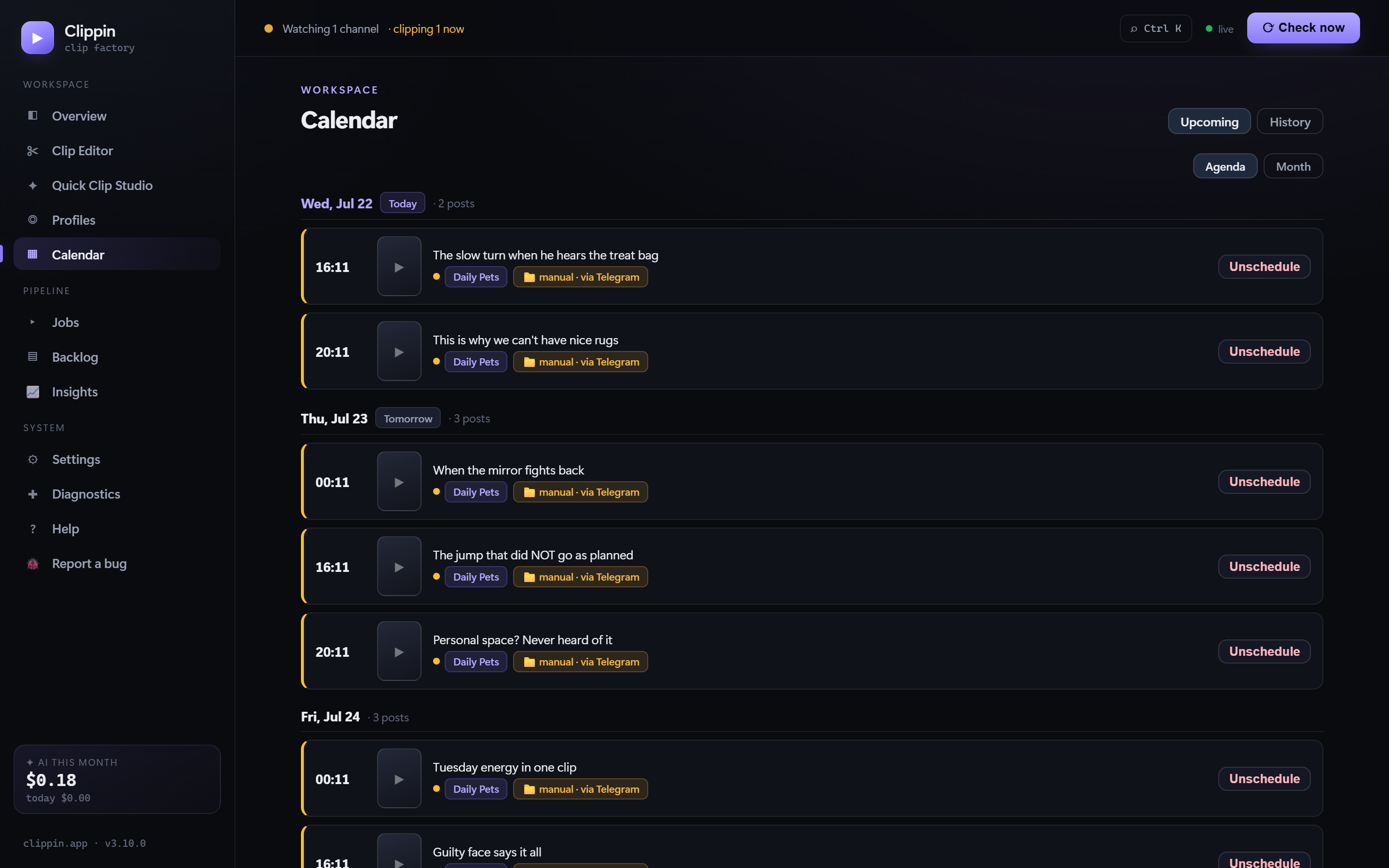
Always know what posts next

A real content pipeline not another basic scheduler.

See upcoming posts, manage the backlog, retry failures, and keep multiple profiles organized from one dark, focused dashboard — whether posts go out automatically or you post them yourself.

  • Agenda and calendar views
  • Natural, spread-out posting times
  • Free manual mode — a posting plan with each clip delivered to your Telegram at post time, no posting account needed
  • Back-catalog backfill, crash recovery, one-click retries
Upcoming posts
Clippin calendar with scheduled vertical clips
Runs itself

Set it up once, check the dashboard.

Review mode

Prefer control? Hold finished clips for one-click approval before anything gets posted.

🧭

Guided setup

A step-by-step first-run wizard walks you through every key and your first profile, with inline save + test buttons — clipping in minutes, not manuals.

Runs itself

Lives in the system tray, keeps working with the window closed, recovers after restarts, retries failures.

Stays healthy

Daily Telegram digest, download health alerts, and a self-updating downloader that keeps up with YouTube's changes.

Live dashboard

A real schedule calendar, job history, backlog manager, and a status heartbeat that tells you what's happening now.

Fast to drive

A Ctrl+K command palette, organized tabbed settings, and a native-feel desktop app window.

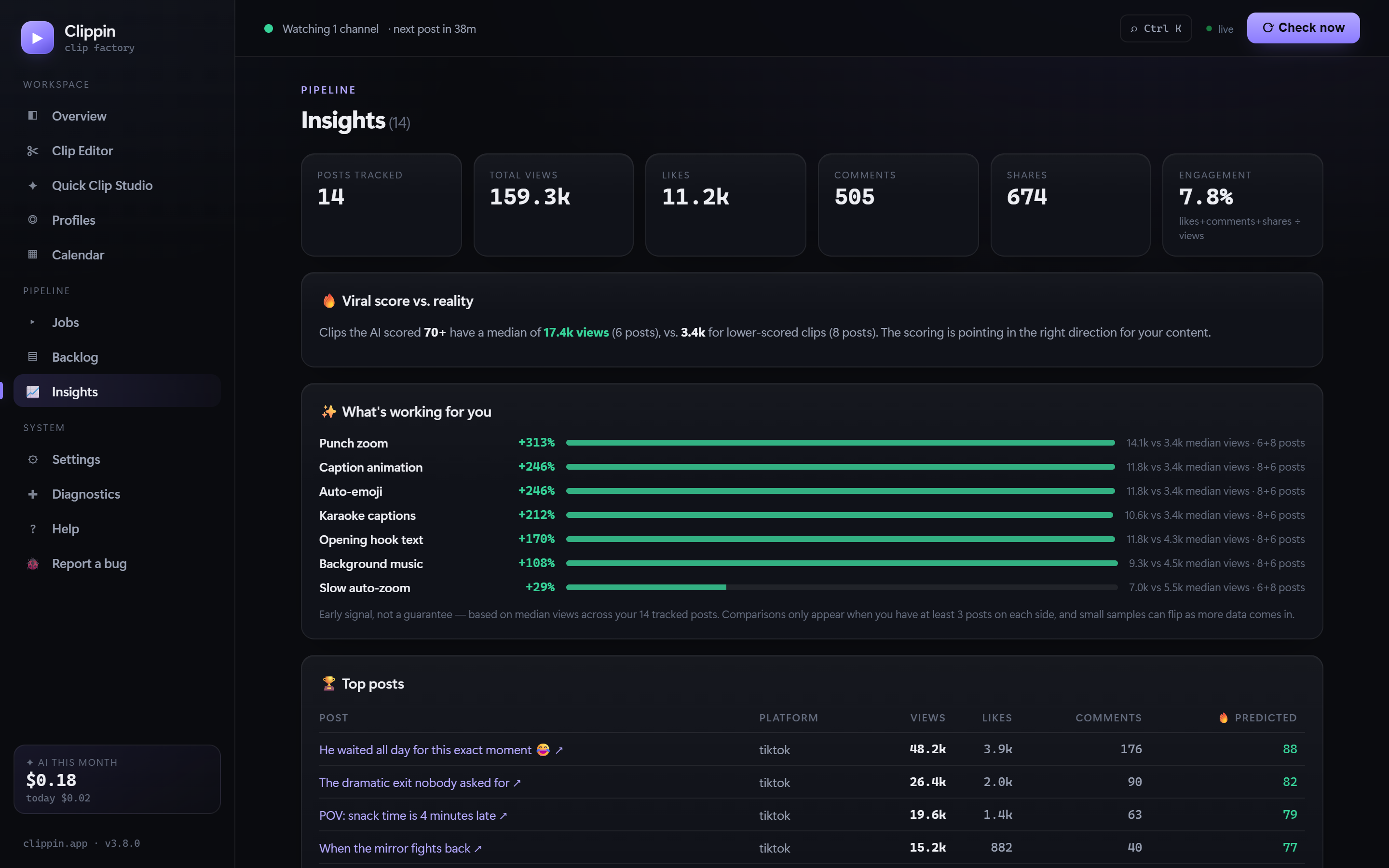
Insights · new in 3.8

Your own results, turned into answers.

After your clips go live, Clippin pulls their real views, likes, comments, and shares back automatically and shows performance right on each clip — then compares your posts against each other to tell you what's moving the needle.

  • Live metrics on every posted clip, next to its 🔥 predicted viral score
  • Prediction vs. reality — do your high-scored clips really win?
  • “What's working for you” — hooks, captions, zooms, music & more, compared honestly on your own numbers
  • Top-posts leaderboard linking straight to the live posts
Insights
Clippin Insights page with real post performance and feature comparisons
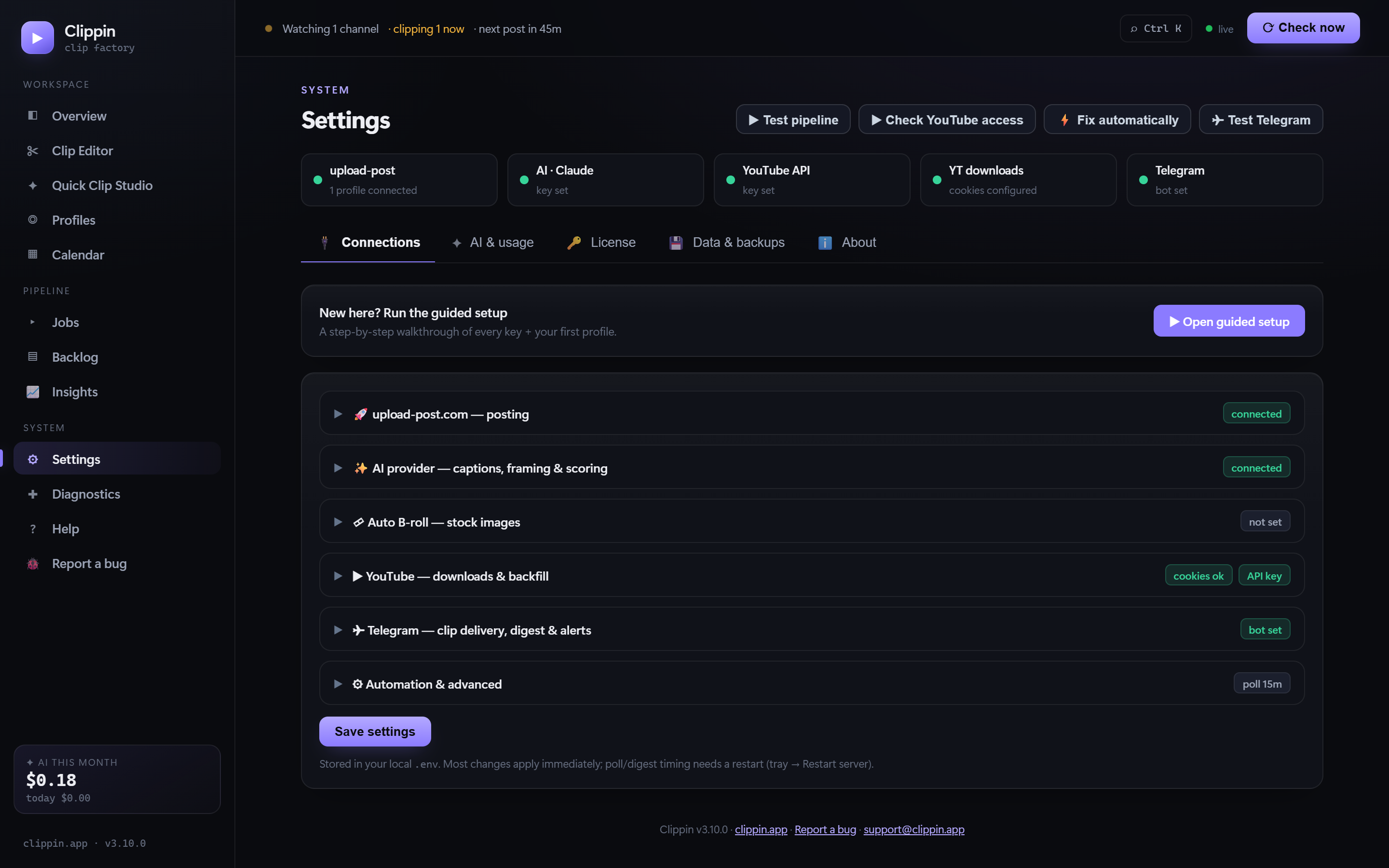
Secure local settings
Clippin local settings dashboard with configured services
Your machine. Your files. Your control.

Skip the cloud processing meter.

Clippin is a Windows desktop app. Downloads, clipping, and even speech-to-text transcription run on your own PC, using your own connection and browser login. No per-video processing charge from Clippin, and no remote library holding your source files or audio.

Local transcriptionLocal databaseDaily backupsBundled ffmpeg
Feature FAQ

The details people ask about.

Can I edit clips by hand?

Yes — the Clip Editor is a full timeline studio. Scrub the video, mark each clip, and shape it yourself: hand-frame the 9:16 crop (drag it, keyframe a pan & zoom, or let AI follow the subject), edit the caption words, and add per-clip effects like flip, speed, fades, and colour — with a live preview over your real footage. Or let the automatic mode pick and render the moments for you.

Do captions work on any video?

Yes. Clippin transcribes speech on your own PC with a bundled, local Whisper model — so word-pop and regular captions work on any video, including your own files with no captions. Nothing is uploaded; a one-time ~140MB model downloads the first time you use it.

What are word-pop (karaoke) captions?

The signature short-form look where each word highlights the moment it's spoken. Clippin generates them automatically from local transcription — on by default — and you can style the font, color, size, and position in Quick Clip Studio.

Can I use my own video files or music?

Yes. Point Clippin at a video file on your PC to clip it directly, and give it a folder of your royalty-free music to mix a random track into each clip. (You supply the music — free libraries like Pixabay work great.)

Can it process older videos?

Yes. Backfill gradually works through a channel’s older uploads while keeping the future schedule under control.

Will it keep working as YouTube changes?

Yes — Clippin's downloader updates itself weekly, and the app tells you in the sidebar when a new Clippin version is available.
Try everything, free.

Make up to 30 clips free in Quick Clip Studio — no card needed. One-time purchase unlocks it all.